GTA 6 Ultrawide Support: Will 32:9 Super Ultrawide Break PvP?
Quick Intel
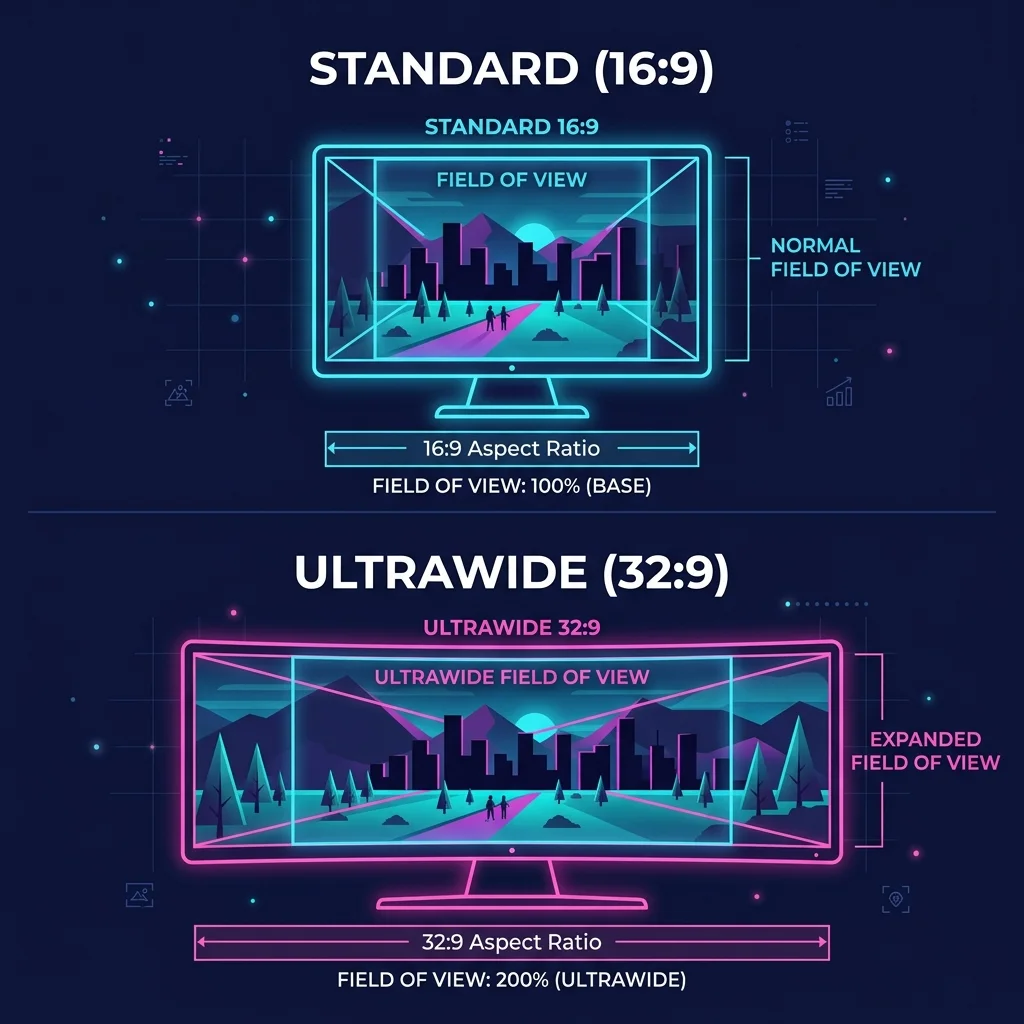
- 32:9 super ultrawide monitors expand horizontal Field of View (FOV) to ~140°, delivering an undeniable early-warning advantage in GTA Online PvP.
- Recent CyberLeek telemetry leaks confirm RAGE 9 renders active aerodynamics, cockpit instrumentation, and witness AI detection cones in wide aspect ratios.
- HUD safe-zone customization will be critical to prevent the minimap and health bar from causing neck strain at screen edges.
- Using third-party memory injectors like Flawless Widescreen carries severe permanent ban risks under Rockstar’s updated BattlEye anti-cheat.
- We benchmark 16:9 vs 21:9 vs 32:9 performance penalties and recommend top calibrated displays for Leonida.
When it comes to competitive open-world gaming, every millisecond of reaction time and degree of peripheral vision matters. As millions of players prepare for the eventual PC release of Grand Theft Auto VI and its next-generation GTA Online multiplayer ecosystem, the biggest debate among hardcore enthusiasts isn't just about frame rates — it's about the horizon.
With 32:9 "super ultrawide" OLED displays (like the 49-inch Samsung Odyssey G9) becoming mainstream, a growing tier of players has access to double the horizontal screen real estate of standard monitors.
Does this massive horizontal expansion create a genuine "pay-to-win" advantage across the chaotic streets of Vice City?
Here is our comprehensive master guide covering mathematical FOV calculations, CyberLeek leaked vehicle telemetry, competitive PvP scenarios, HUD safe-zone optimizations, and anti-cheat ban safety.
16:9 vs 21:9 vs 32:9 Aspect Ratio Comparison Matrix
| Aspect Ratio | Typical Resolution | Horizontal FOV Angle | Pixel Render Count | GPU Performance Cost | Radar Peripheral Blind Spot | Competitive Advantage Score |
|---|---|---|---|---|---|---|
| 16:9 (Standard) | 2560x1440 / 3840x2160 (4K) | ~90° Horizontal | 3.68M (1440p) / 8.29M (4K) | Baseline (0%) | High (Requires constant camera panning) | ⭐⭐⭐ (Fair / Neutral) |
| 21:9 (Ultrawide) | 3440x1440 / 5120x2160 (UW 4K) | ~115° Horizontal | 4.95M (~34% more pixels) | -15% to -25% FPS | Low (Covers natural peripheral vision) | ⭐⭐⭐⭐ (Optimal Balance) |
| 32:9 (Super Ultrawide) | 5120x1440 (Dual QHD) | ~142° Panoramic | 7.37M (~100% more pixels) | -35% to -50% FPS | Zero (Full 180° awareness in driving) | ⭐⭐⭐⭐⭐ (Tactical Superiority) |
The Pay-to-Win Peripheral Vision Advantage in GTA Online PvP
In open-world PvP combat, situational awareness is the difference between successfully securing a million-dollar contraband delivery or getting sniped from three blocks away.
Standard 16:9 displays limit horizontal vision, forcing players to constantly swing their mouse or analog stick to clear side streets.
A 32:9 super ultrawide completely changes this dynamic:
CyberLeek Telemetry Leaks: RAGE 9 Active Cockpit & Aero Modeling
The mid-August CyberLeek developer leak provided unprecedented insight into how RAGE 9 processes wide aspect ratios:
The Frustrating HUD Positioning Dilemma
While the extra field of view is undeniable, unoptimized game engines can turn 32:9 gaming into a literal neck-straining nightmare.
The Problem: HUD Edge Anchoring
If Rockstar pushes HUD elements to the extreme physical edges of a 49-inch screen, checking your health bar, ammo count, or radar requires physically rotating your head 30 degrees to the left or right. In high-stakes shootouts, looking away from your reticle for even 200 milliseconds is fatal.
The Solution: Centered HUD Safe-Zones
To optimize GTA 6 for 21:9 or 32:9, configure these settings:
Anti-Cheat Ban Risks: Flawless Widescreen vs BattlEye
In previous titles like GTA V, players relied on third-party memory hooks (such as Flawless Widescreen) to fix aspect ratio FOV locks in cutscenes and adjust UI scaling.
[!WARNING]
Using memory injectors in GTA 6 Online carries extreme risk.
Rockstar Games has integrated kernel-level anti-cheat (BattlEye) that actively scans process memory. Injecting custom .dll hooks to uncap FOV in GTA Online will trigger automated account bans. Always rely on official in-game settings rather than third-party executables.
Top 3 Recommended Ultrawide Monitors for GTA 6
| Monitor | Specs & Panel | Why It Excels in GTA 6 |
|---|---|---|
| Samsung Odyssey OLED G9 (G95SD) | 49" 32:9 • 5120x1440 • 240Hz • QD-OLED | The undisputed king of super ultrawide. 0.03ms response time and infinite contrast. |
| LG UltraGear 34GS95QE | 34" 21:9 • 3440x1440 • 240Hz • W-OLED | Perfect competitive sweet spot. Much easier to drive on mid-range GPUs (RTX 4070 / RX 7800 XT). |
| Alienware AW3423DWF | 34" 21:9 • 3440x1440 • 165Hz • QD-OLED | Exceptional value QD-OLED with vibrant color accuracy and factory HDR1000 calibration. |
Frequently Asked Questions (FAQ)
Will GTA 6 support 21:9 and 32:9 natively on PC?
Yes. Modern RAGE engine titles (including Red Dead Redemption 2) support native 21:9 and 32:9 gameplay resolutions out of the box.
Will cutscenes have black bars on ultrawide monitors?
Historically, Rockstar renders story cutscenes in a fixed 2.39:1 or 16:9 cinematic aspect ratio to maintain narrative framing, which may introduce pillarboxing (black bars on the sides) during scripted cinematics while keeping free-roam gameplay fully ultrawide.
What GPU do I need for 5120x1440 in GTA 6?
Because 5120x1440 pushes 7.37 million pixels (close to 4K's 8.29M), we recommend at least an NVIDIA RTX 4070 Ti Super, RTX 4080, or AMD Radeon RX 7900 XT to maintain steady 60+ FPS with high ray tracing settings.
Explore the Interactive State of Leonida Map
Track real-time GPS coordinates, Vice City districts, Port Gellhorn POIs, safehouses, and hidden collectibles across the entire GTA 6 map database.
Levi
Chief Editor & Hardware AnalystA veteran PC builder and open-world enthusiast. Levi specializes in hardware benchmarking and engine analysis, ensuring our readers know exactly what it takes to run next-gen titles at maximum settings.
Sources & References
- Widescreen Gaming Forum (WSGF) Aspect Ratio Database
- CyberLeek Developer Build Telemetry Archive
- Rockstar Advanced Game Engine (RAGE 9) Camera Projection Specs
- RTINGS Display FOV Benchmark Suite